
Here a quick tutorial how to install Ffmpeg quickly in Windows Server or in your local computer.
Why i should install FFMPEG ?
Joomvideos require Ffmpeg program and other tools to be installed in your server to be able to convert uploaded videos from computer to HTML5 format (mp4, webm and ogg).
Instructions:
- Here links list
- FFMPEG here: https://ffmpeg.zeranoe.com/builds/
- Other FFMPEG tools (QT-Faststart, Yamdi ...)
- Download tools and put them in a new folder (name it ffmpeg for example) in your c: drive
- Now change tools paths , go to JoomVideos dashboard -> then configuration -> click on server tab
And change paths as in this screenshot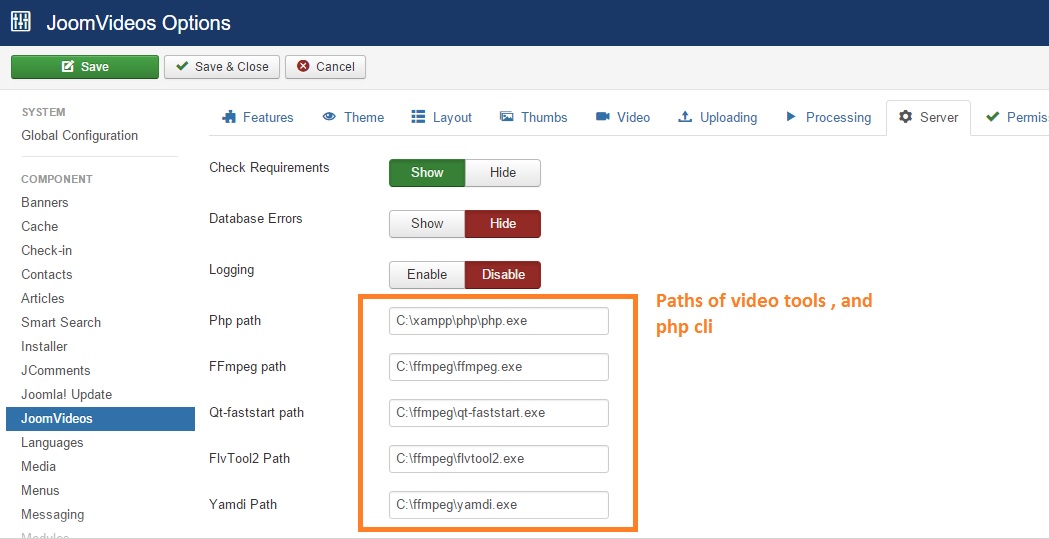
- And you will see all requirements are enabled , like in screenshot

Note: if you still see ffmpeg value "No" , try to clear cache in administrator/cache folder